Know what your competitors changed, and why it matters.
CIM watches your competitors' pricing pages, changelogs, job posts, app-store reviews and news, keeps a timeline of every change with its before and after, and writes one plain-English digest of what changed and why it matters.
One page for each competitor
Open a competitor to see its change timeline, AI visibility, site changes, sources, battlecard and settings in one place.
Sample data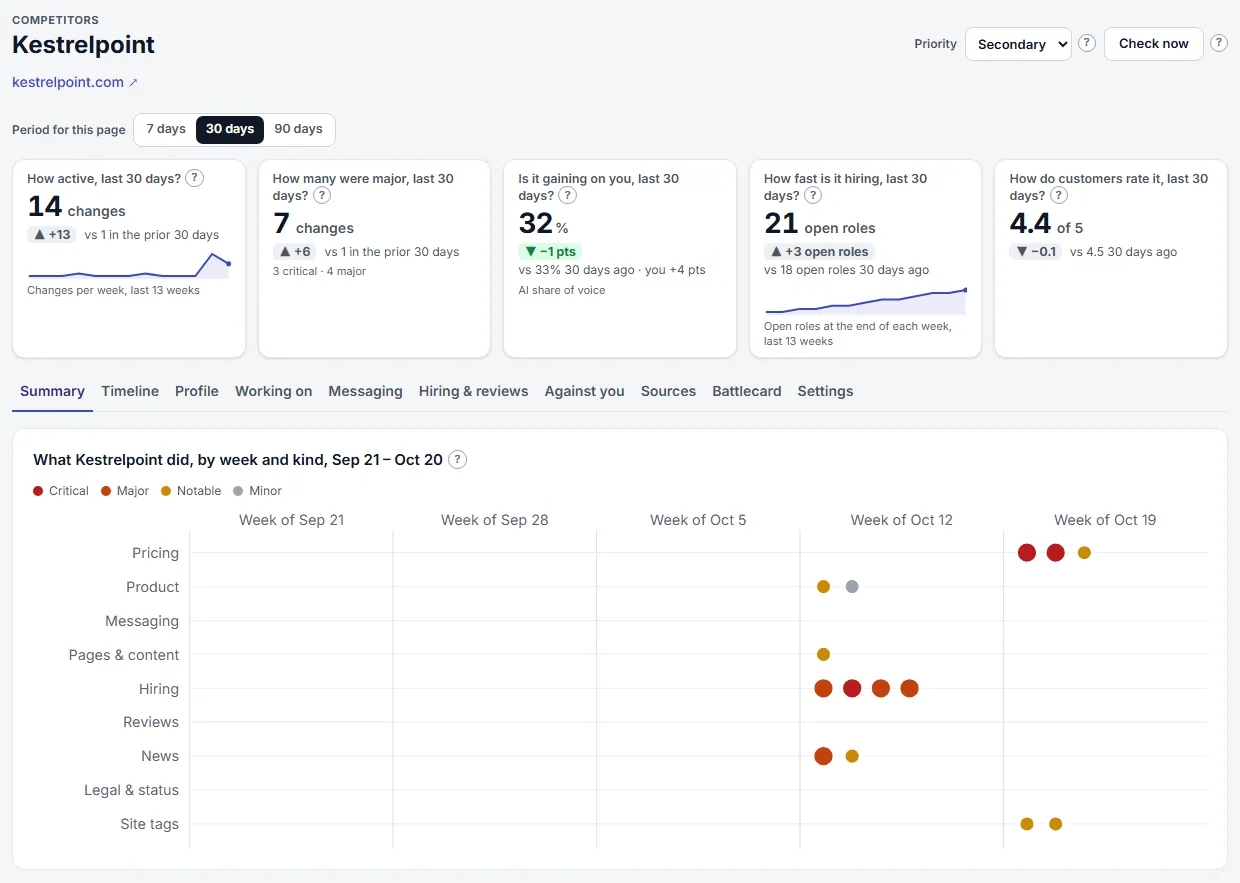
Competitor Page. Open one competitor to see five answers about it at a glance, then ten views: Summary, Timeline, Profile, Working on, Messaging, Hiring & reviews, Against you, Sources, Battlecard and Settings. Every change, newest first
Each detected change carries an importance badge, its source, the time and a one-line explanation of why it matters. Filter by source or importance, or search the summaries.
Sample data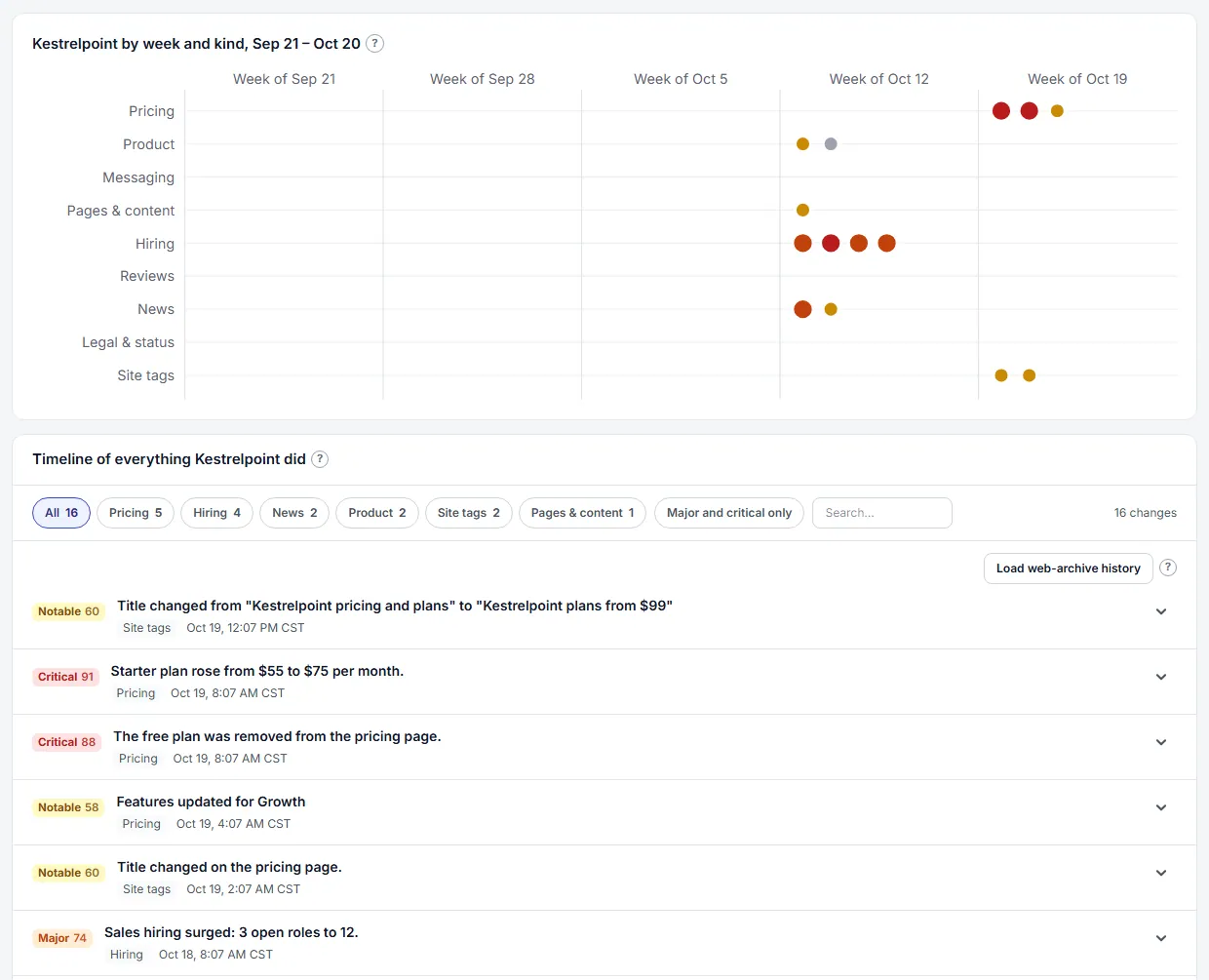
Timeline of Everything a Competitor Did. Browse everything a competitor did, week by week and kind by kind, filter it, and open the before-and-after and the evidence of any change. The before and after
Open a change to see exactly what was before and after: a plan table for pricing, a line-by-line comparison for changelogs and site changes, added and removed lists for roles.
Sample data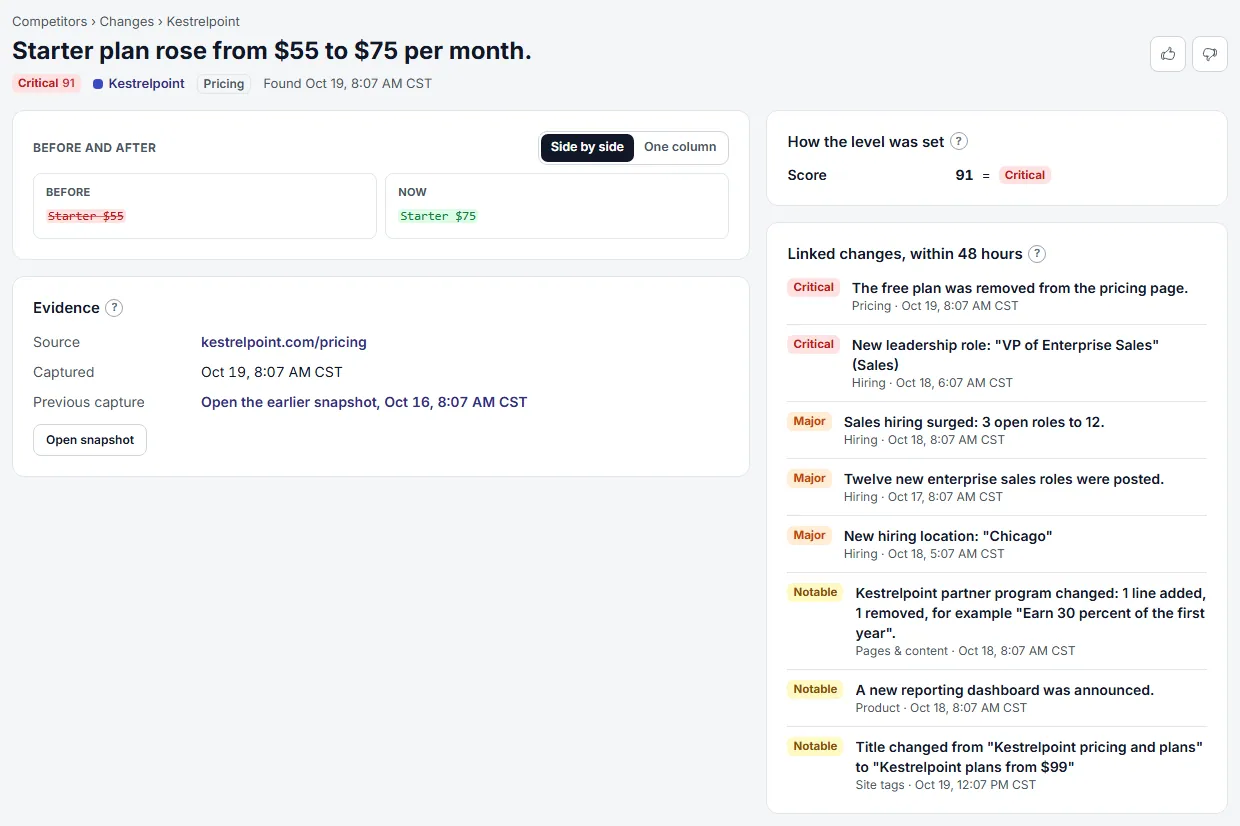
Change Detail. Open one change to see its level and how it was set, why it matters, exactly what was before and after, the evidence, and the changes linked to it. One digest for all competitors
One headline, then your competitors: the major changes and a short written read for each, with importance pills and a link from every change to its record. Your own company comes after, in a part of its own.
Sample data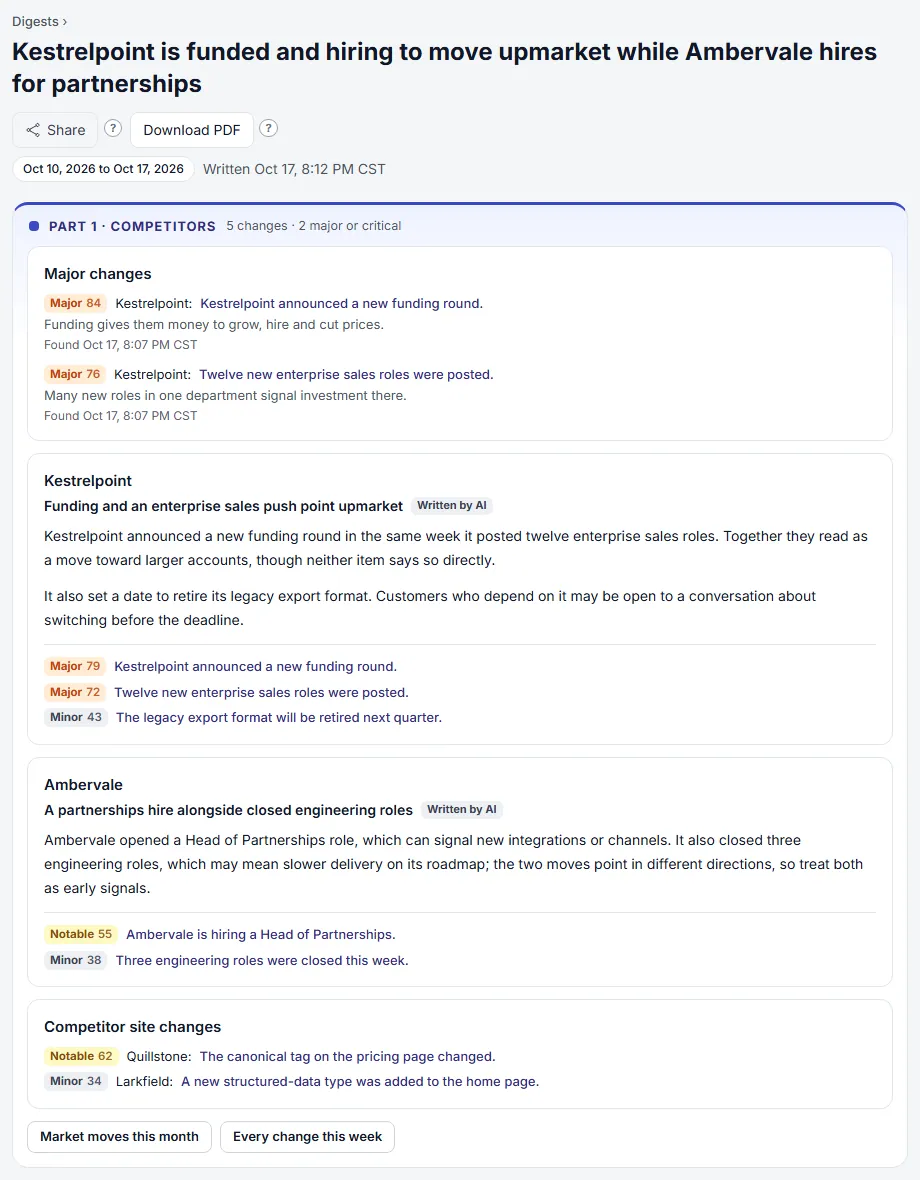
One Digest for All Competitors. One digest per workspace covers every competitor, with links to the evidence behind each change. A past to look back on
Load up to a year of a competitor's past pricing and changelog changes from the public web archive. A new competitor starts with history after its first check.
Sample data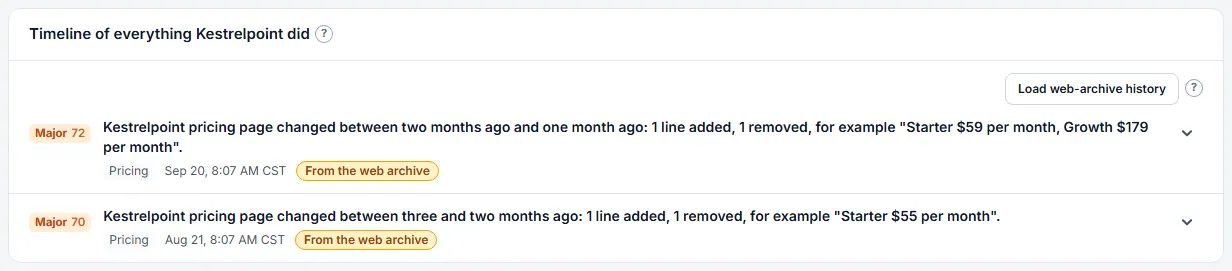
Web-Archive History. Load up to a year of a competitor's past pricing and changelog changes from the public web archive. Competitors you do not track yet
Brands that AI answers keep naming appear as suggestions, with how many answers named each. Add one to your list or dismiss it.
Sample data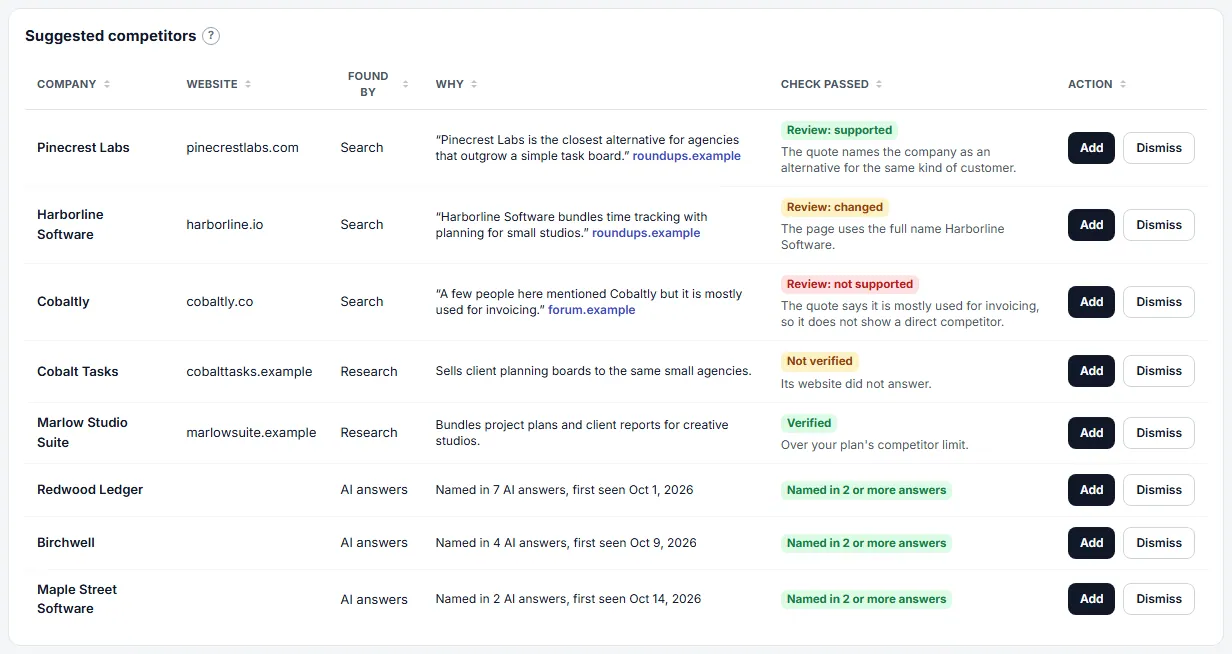
Suggested Competitors. See competitors waiting for you in one table, with where each was found, why and the check it passed, and add or dismiss each. A one-page battlecard
A competitor's latest pricing, its most significant changes of the last 90 days, open roles by department, the review rating trend and its AI visibility, ready to download as a PDF or a Markdown file.
Sample data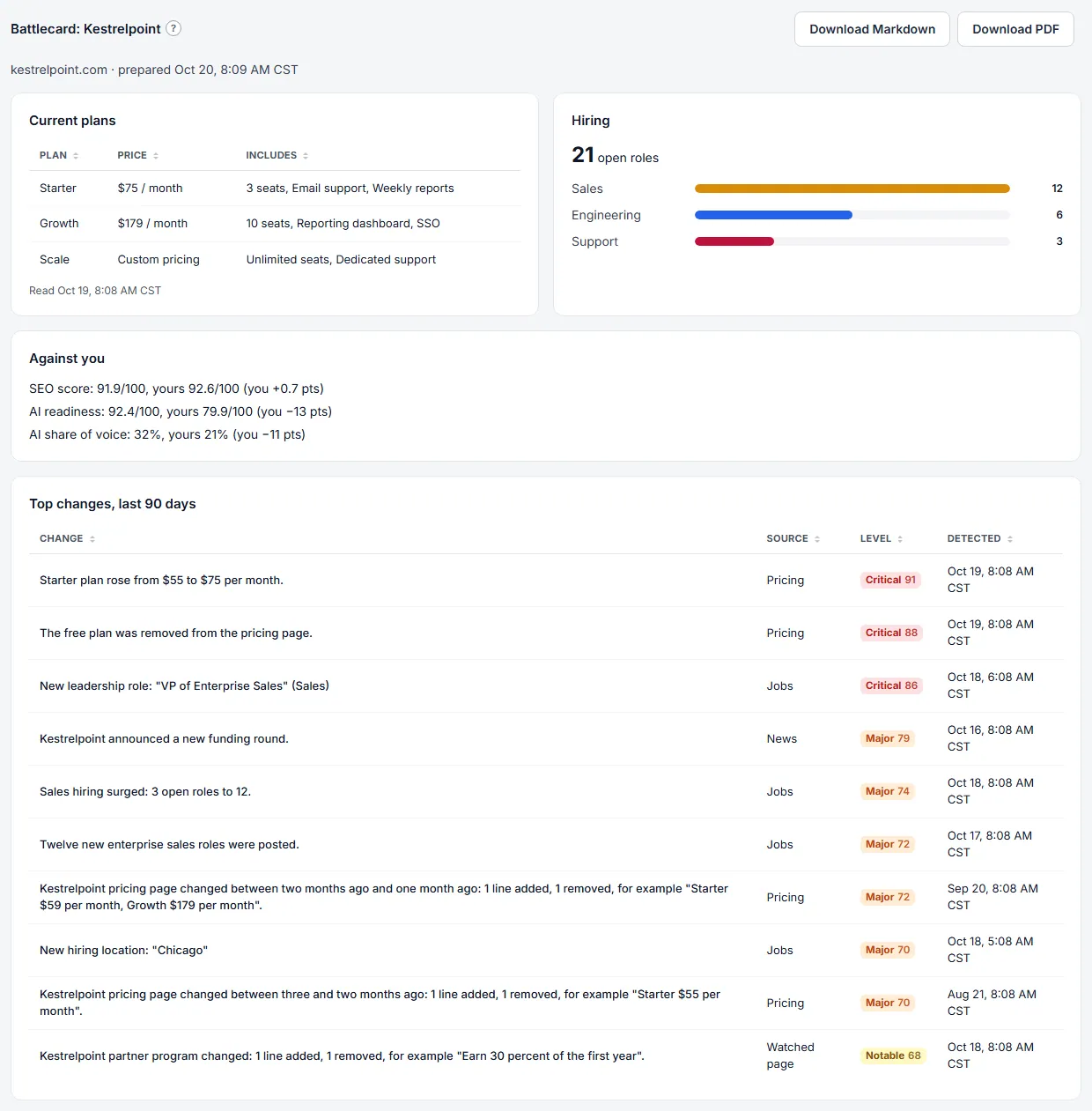
Competitor Battlecard. A one-page summary of a competitor, with how it stands against you, to download as a PDF or a Markdown file.
And more in Competitor Intelligence
Setup Wizard
Enter your company's website, review the competitors found for you, and finish: the first checks start at once.
Add a Competitor
Add a competitor by name and domain, with an optional pricing page address.
Find Competitors
Let the assistant find your competitors from your company details; each is checked and the verified ones are added.
Manage Monitored Sources
See every source with its confidence out of 100 and its status, turn it on or off, edit it, and add new ones.
Pricing Page Monitoring
Watch a competitor's pricing page for new or removed plans, and for price, limit, free-period and add-on changes.
Changelog Monitoring
Watch a competitor's release notes or changelog feed for new and updated entries.
Job Post Monitoring
Watch a competitor's job board for roles opened and closed, hiring surges and leadership hires.
Review Monitoring
Watch a competitor's App Store ratings and the themes reviewers raise.
News and Press Monitoring
Watch for news articles and press mentions about a competitor.
Watched Pages
Watch any public page for changes to its main text, such as a partner list or a terms page.
New and Removed Page Monitoring
Watch a competitor's sitemap for new and removed pages, grouped by section, with new sections and new languages called out.
Blog and Press Monitoring
Watch a competitor's blog, press and podcast feeds for new posts, with funding, launch and leadership news scored higher.
Legal and Trust Page Monitoring
Watch a competitor's terms, privacy, security and trust pages and subprocessor list for changes, new compliance standards and new vendors.
Status Page Monitoring
Watch a competitor's public status page for new incidents and incidents that get worse.
SEC Filings
See the recent annual reports, quarterly reports, current reports and registration statements a public competitor filed with the SEC, each with its filing date and a link to SEC's page for it.
Contract Awards
See the recent U.S. federal contracts a competitor has won, once you confirm which company on USAspending.gov it is.
Scheduled Source Checks
Each kind of source is checked on its own schedule, politely and with retries.
Check a Competitor Now
Start an immediate check of all of a competitor's enabled sources.
Weekly Source Search
Every Sunday the service looks again for sources a competitor is missing and suggests what it finds.
Checked Suggestions
Every suggestion shows the check it passed or failed and why it was suggested; older web-search suggestions show their quote.
Competitor Social Channels
Enter a competitor's social accounts so cited posts and pages can be matched to it.
Competitor List
See every competitor as a tile with its priority, source health, the last 30 days of changes, how it is moving, its highest change and the projects it is working on.
Source Health
See how reliably each source has been checked, and fix the ones that fail.
Snapshot Viewer
See a saved copy of a source as it looked when it was checked.
Changes Across All Competitors
See every change from every competitor ranked by importance, with level tiles, a grid of where the changes are, and filters by level, competitor, kind, words and what is new for you.
Saved Views
Save a set of filters under a name and come back to it with one choice.
Custom Views
Arrange your own boards from thirty ready-made widgets that read the figures already stored.
Custom View Layout
Add, remove, move and resize the widgets of a view, share it, bookmark it or delete it.
Importance Rating and Written Digests
Each detected change is rated for importance by fixed rules and summarised in plain English.
Cross-Source Correlation
Changes that line up across several kinds of source score higher.
Digest List
See when the next digest goes out, what is in it so far and who gets it, then search every digest your workspace has had by competitor, date range and type of change.
Read and Share a Digest
Read a digest in two parts, Competitors and Your company, share it by link and save it as a PDF.
This Week So Far
See the changes collected since the last digest and write a private draft of the next one.
Market Moves
A monthly look at your market on the Market moves tab, built from the changes already recorded for your competitors, with the page behind every item and the month's changes counted by kind.
Shared Digest Links
Create a private read-only link to a digest that anyone can open without signing in, and turn it off at any time.
Protected Share Links
Share a digest or report by link, with an optional password, and turn each link off when you are done.
Client Reports
Issue a frozen report from the sections and the period you choose, or from a template, then download it as a PDF or CSV or share it by link.
Report Templates
Start a report from a named set of sections, and save your own sets for next time.
Report Branding
Put your logo, colours and footer on issued reports, their PDF files and shared report pages.
Digest Delivery by Email
New digests are sent to the team by email.
Digest Recipients and Style
Choose which members get the digest, which competitors and sources each sees, and its tone and length.
Instant Alerts for Big Changes
Get a notice and an email straight away when a change reaches your threshold.
Major Change Flags
Every change that matters is flagged by fixed rules and shown in the bell and at the top of the digest.
Notices
A bell and a list tell you what happened: scans, major changes, alerts, broken sources, digests and lost connections.
Notification Settings
Choose, for each kind of notice, whether it appears in the bell and whether it is also emailed to you.
Data Exports
Download any table as CSV or JSON; large tables and the all-answers zip are made in the background.
Export Column Sets and Resume
Save a choice of columns under a name to download again, and start a stopped export again.
Looker Studio Data Feed
Read your tables in Looker Studio through a private CSV address that you can turn off at any time.
Data API and Keys
Make API keys for your own tools or an AI assistant, set their expiry, limits and competitors, and read your competitors, changes and digests.
Assistant Server
Let an outside AI assistant read your competitor and AI visibility data with the same tools as the API, and add or archive prompts when its key allows it.
In development
These are not available yet. They will appear in the product when they are ready.
- In development
Slack delivery
Digests and alerts posted to Slack, with a channel per competitor.
- In development
Trustpilot and Google Play reviews
More review sources through official access.
Questions
How often are competitors checked?
Each kind of source has its own schedule: pricing pages daily, changelogs and job boards every 8 hours, news every 6 hours and reviews weekly. CIM waits at least 30 seconds between requests to the same site and skips pages a site's robots file closes to it.
Does CIM read pages behind a login?
No. CIM reads public pages only, and only where the site allows it.
Get early access.
CIM is in private beta. Request access and we will reach out when your place opens.
See plans