See which brands AI answers name when your buyers ask.
CIM asks the questions your buyers ask, on a schedule, and records which brands the answers name, where they rank and how they are described. You see your share next to your competitors and the sources behind every answer.
Visibility and share of voice
How often your brand is named, and your share of all brand mentions, next to each competitor, week by week.
Sample data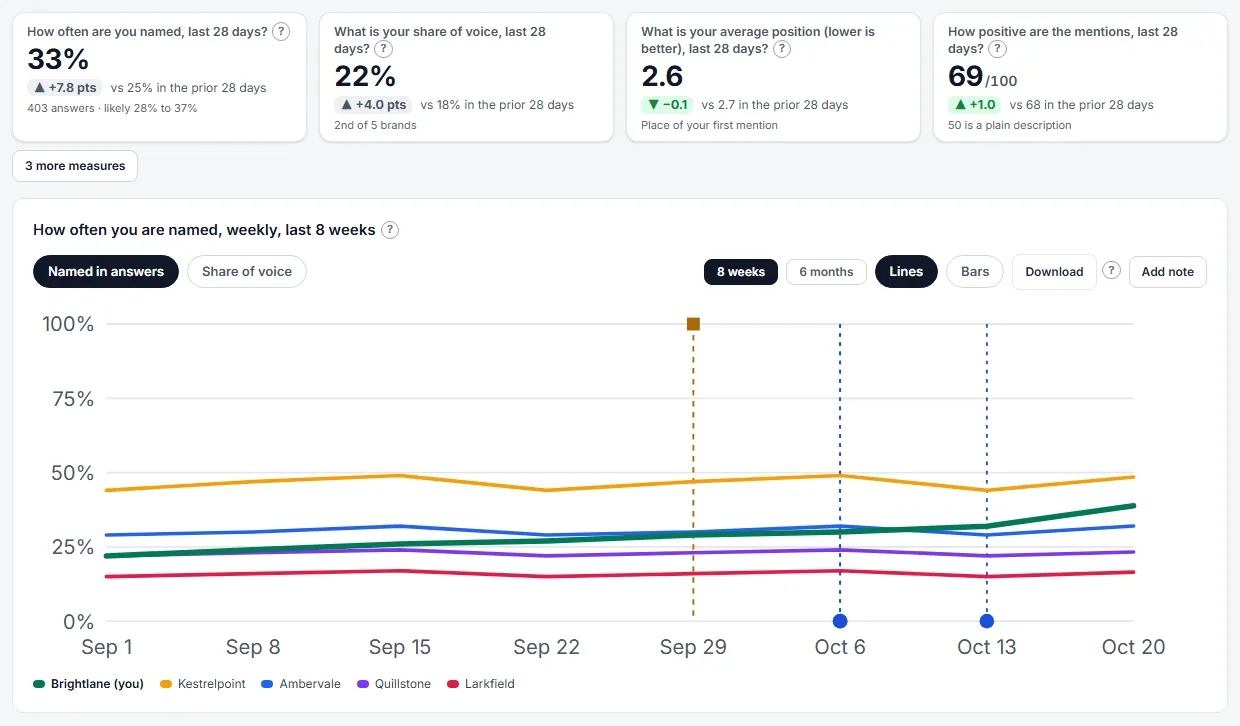
AI Visibility Overview. See how often AI answers name your brand, against your competitors, week by week. Benchmark against every rival
Visibility, share of voice, position, sentiment and win rate for every tracked brand, and the prompts where rivals lead.
Sample data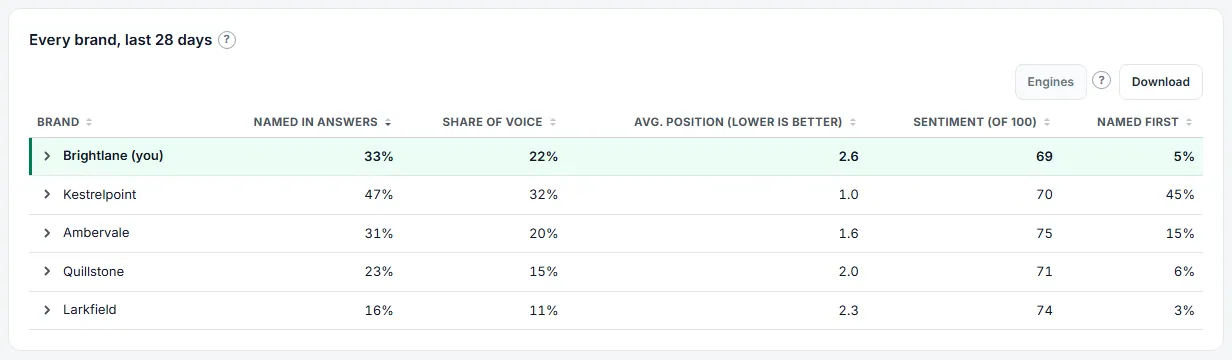
AI Visibility Benchmark. Compare every tracked brand side by side and see where rivals lead. Risers and fallers
Which topics and competitors are gaining or losing visibility against the period before.
Sample data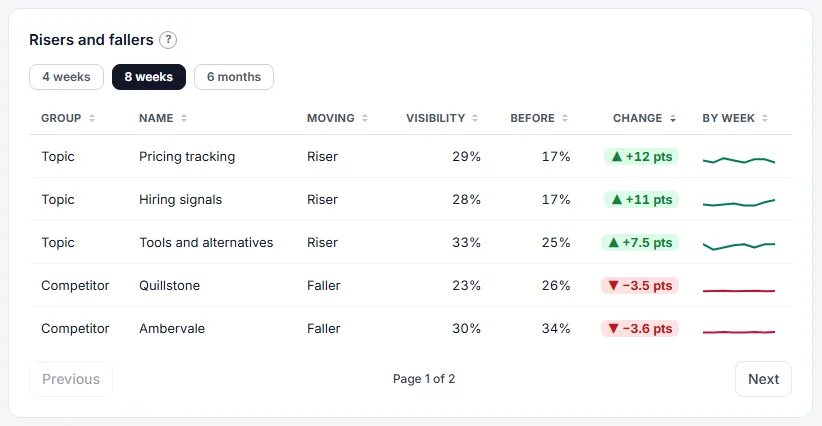
AI Visibility Risers and Fallers. See which topics and competitors are gaining or losing visibility against the period before. Perception
The attributes AI answers give each brand, scored, with the objections they raise.
Sample data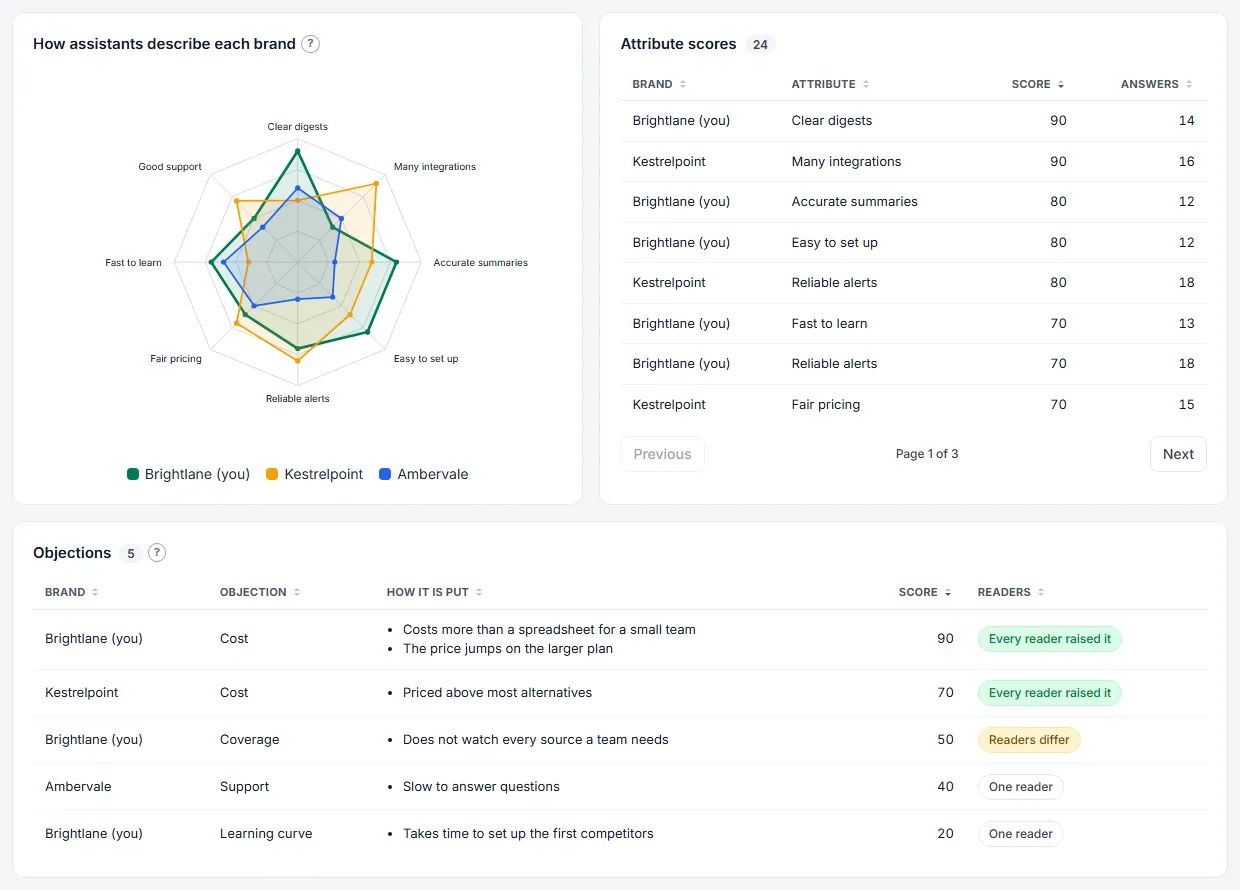
AI Perception. See how AI answers describe your brand and your closest rivals, and what objections they raise. Facts and accuracy
A library of true facts about your company, checked against the claims AI answers make about your brand: supported, contradicted, inconclusive or not covered.
Sample data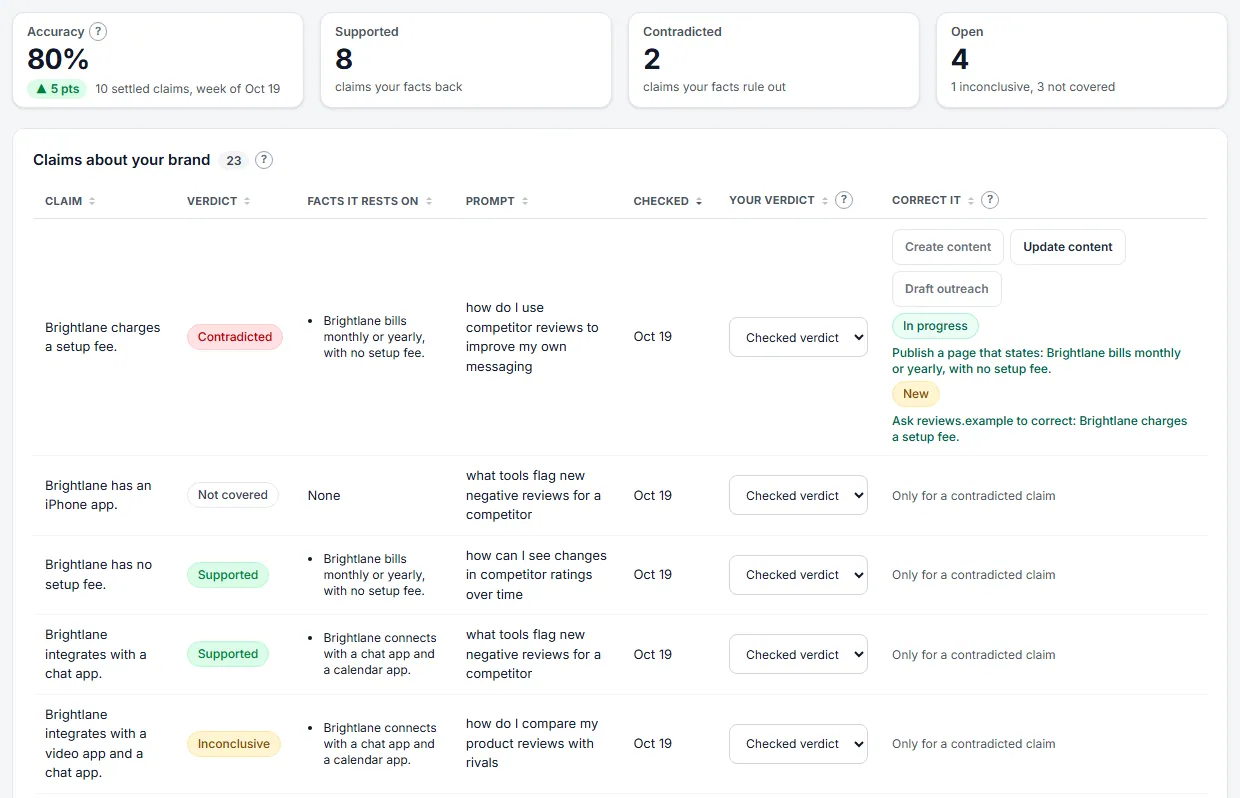
Facts and Accuracy. Keep a library of true facts about your company and see how many of the claims AI answers make about your brand they back or rule out.
Answers are measured through an AI assistant's programmatic interface. The assistant's own consumer app may answer differently, so treat the figures as a measured sample, not a guarantee.
And more in AI Visibility
AI Visibility Scans
Each day the workspace's tracked prompts are put to an AI assistant, and the answers are measured.
AI Visibility Prompts
Choose the questions put to an AI assistant about your market, and review suggested ones.
AI Visibility Prompt Results
Open one prompt to see how it does week by week, which brands, pages, sites and searches its AI answers used, and its latest answers.
Research Prompts
Let CIM write the questions your buyers ask AI and add the ones that pass the checks.
Prompt Builder
Answer a few questions and get draft prompts, with warnings for wording that could steer the answer.
Brand Names and Aliases
Tell the service every name your brand and each competitor go by.
Name Matching and Brand Merges
See brand names in answers that none of your brands owns, map them to a brand, merge two competitors with a full undo, and move the mappings as a file.
Parent Brands, Left-Out Brands and the Counting Rule
Put a product line under its maker, leave a brand out of every figure, and choose which answers count as naming a brand.
AI Visibility Overview Sources and Chart Options
Switch the brand chart between lines and bars, download it as a picture or as data, and see which kinds of site, domains and pages the answers cite.
AI Visibility Brand Results
Open a brand to see its figures, its strongest and weakest assistant, its weeks, its rankings and the brands named beside it that you do not track.
AI Visibility Answers
Read every answer an assistant gave, with your brand and others marked.
AI Visibility Answers by Prompt
List each prompt once with its answer count and the share of its answers that used a web search, showed links or compared products, in columns you choose.
Add Answers You Collected
Paste an answer, or upload a CSV or JSON file of answers, so they count in your AI Visibility figures.
Personas and Markets
Ask your prompts as different kinds of people and from different places, and copy prompts to other countries and languages.
Closed-Book Visibility
See how often an assistant names your brand from memory alone, with web search turned off.
AI Visibility Performance Matrix
Cross any two of brand, topic, country, prompt and tag to see where your visibility is strong.
AI Visibility Cuts
See how often your brand is named for each buying stage, persona and language, with the answers and likely range behind every row.
AI Visibility Country Map
See on a tile map of the world which countries name your brand most, with each country's figures in a list.
AI Visibility Topic Priorities
Place every topic by how often you are named against how often your own site is cited.
Perception Settings
Set the industry the market question is written for, see how often each question is asked, start a Perception run now and read the recent runs.
Add Many Facts
Paste up to 50 facts or upload a CSV file, see which are new, already kept or faulty, and add only the new ones.
Draft Facts From Your Website
Have the site read your own website and list the facts it states, then tick the ones that are true.
What Other Sites Say About Your Facts
See where pages on other sites that AI answers cite agree or disagree with your facts.
Correct a Contradicted Claim
Turn a claim your facts rule out into an action: publish a page, update one of your pages, or ask the source to correct it.
Sentiment Review
Settle the sentiment readings the automatic readers could not agree on.
AI Visibility Readers
A second reader and a stronger reviewer check the tone scores, and a monthly perception run profiles how AI answers describe you.
Competitor AI Tab
See how AI answers talk about one competitor.
Chart Notes
Pin a dated note to a time chart, such as a relaunch or a campaign start, so changes in the line have a reason beside them.
Lift Analysis
Measure whether the prompts you worked on gained more AI visibility than the ones you left alone, always labelled as a correlation.
Ask About a Chart Point
Choose a point on a chart, edit the suggested question, and press Send to get a written answer.
Metric Alerts
Get a notice when an AI visibility figure crosses a line you set, once, and again only after it has come back.
Saved Filters
Keep the filters you chose on AI Visibility, GEO or SEO under a name, and meet them again on the next page.
Share-of-Voice Brief
One page that sets your share of voice against the top five competitors, in fixed sentences written by rules.
Preset Reports
Run one of seven ready-made analyses of the stored figures and keep every run.
Campaigns and Dated Changes
Keep the days you ran a campaign or changed a page, to compare the weeks around them.
Campaign Impact
Compare four weeks before a campaign's start day with four weeks from it, and see whether its pages were cited afterwards.
Sentiment Shift
Compare four weeks before a dated change with four weeks from it, and see whether every brand moved the same way.
AI Visibility Overview PDF
Download the whole AI Visibility overview for the last 7, 28 or 90 days as a PDF.
Data API: Brands, Prompts and Answers
Read your brands, topics, tags, prompts, stored AI answers with their full text, and the searches the AI ran, as JSON.
Data API: Reports, Sources and Datasets
Read the brand report with dimensions, filters and a filter tree, the source domain and page reports, every exportable table, and the API documents.
Questions
How are the answers collected?
CIM asks each prompt through an AI assistant's programmatic interface, on a schedule, and stores the answer and the pages it cited. The assistant's own consumer app may answer differently.
Are the figures exact?
No. They are measurements of a sample of answers, and estimates are labelled as estimates.
Can I add answers I collected myself?
Yes. Paste an answer, or upload a CSV or JSON file of answers, and they count in your AI Visibility figures.
Get early access.
CIM is in private beta. Request access and we will reach out when your place opens.
See plans